The short answer
An NFC digital receipt is a receipt the customer collects by tapping their phone on a small device at your counter. NFC stands for near-field communication, the same short-range technology behind contactless cards and phone payments. The phone and the device only talk when they are a few centimetres apart, which is why a deliberate tap works and a walk-past does not.
Instead of a printed slip, the customer’s phone opens an ordinary web page showing their receipt. They don’t download an app or create an account.
What happens at the counter, step by step
- 1. The customer pays as usual — through your existing POS, exactly as before.
- 2. The system reads the sale — the completed transaction is picked up and the receipt is prepared in the background.
- 3. The device is ready — the small device on your counter is updated with that receipt.
- 4. The customer taps — they hold their phone against the device for a moment.
- 5. The receipt opens — an itemised receipt appears on their screen, and they can save it as a PDF or image, or email it to themselves.
Your staff do nothing extra, and the POS itself is untouched.
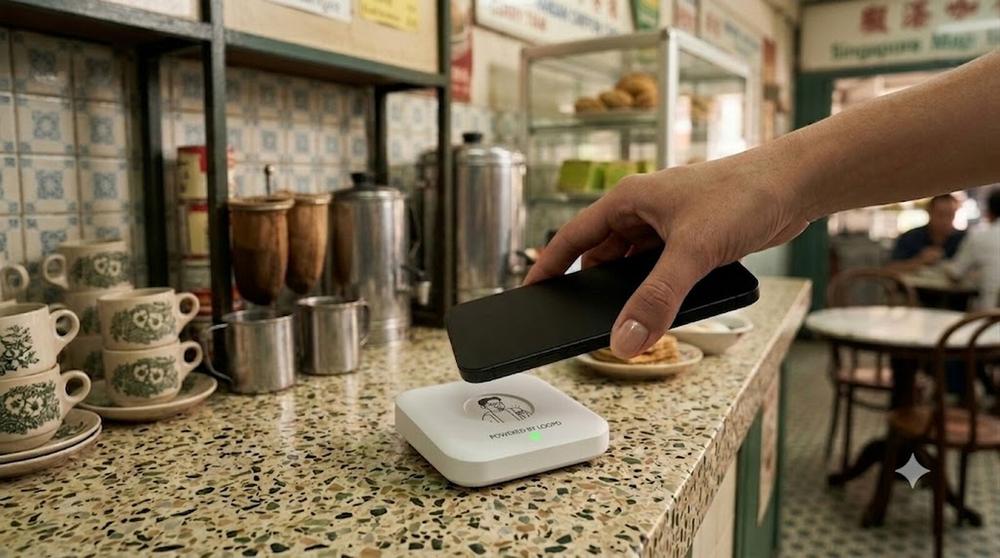
One tap, and the receipt is on the customer’s phone. No app, no account.
Why a tap, rather than a QR code or an email
A QR code asks the customer to open their camera, aim it and wait, often under shop lighting that makes scanning awkward. An emailed receipt asks them to type an address at the counter, which slows the queue and invites typing mistakes.
A tap is the motion people already use to pay. It takes a second, needs no typing and works the same way for every customer. Not everyone will want to tap, and that is fine: a customer who prefers to skip the digital receipt can simply skip it.
What the merchant gets
Every tap can add to a customer record: visit history, spend and loyalty balance, with no data entry by your staff. Customers who join your loyalty programme by entering their phone number are linked to their own record. You see everything in one dashboard, and you can export your customer list to a spreadsheet. You can see how this fits with loyalty and queue on our How It Works page.
What it does not change
A digital receipt layer sits alongside your POS rather than replacing it. Your staff keep working the way they always have, and your sales carry on as normal, because loopd is an addition to the till and not a replacement for it.
A note on tax and record-keeping
A receipt has to carry the right details for your business. If you are GST-registered, ask your accountant what your receipts must show, and check any digital receipt system’s sample receipt against that list before you commit.
Is it right for your business?
NFC receipts suit businesses with many small, quick transactions and customers who come back: cafés, hawker stalls, small retail shops and optical shops. If your customers rarely return, the loyalty and customer-record benefits matter less, though you still stop printing paper.
See an NFC receipt on your own counter
Free demo, no commitment. We bring the device to you.